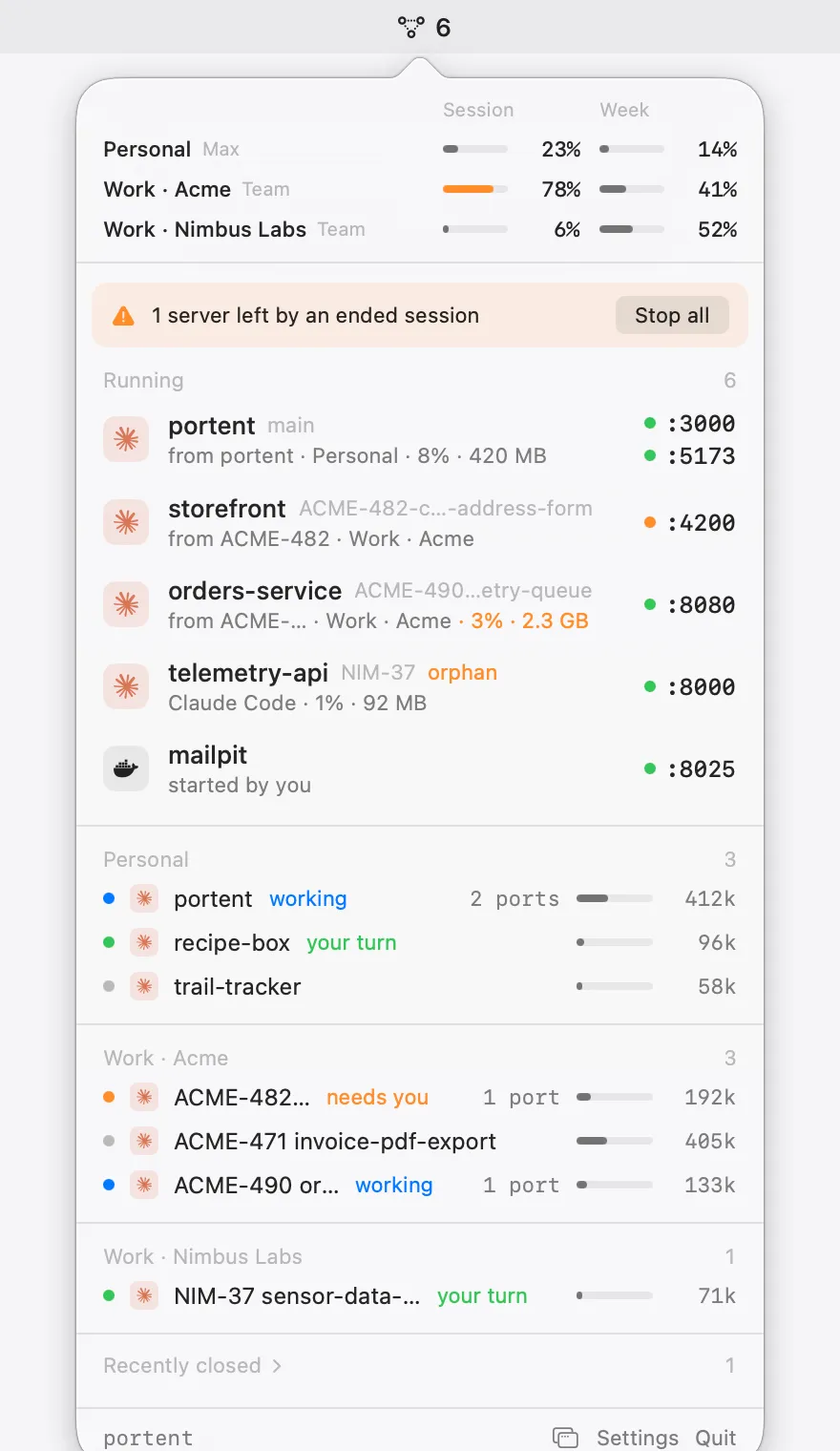
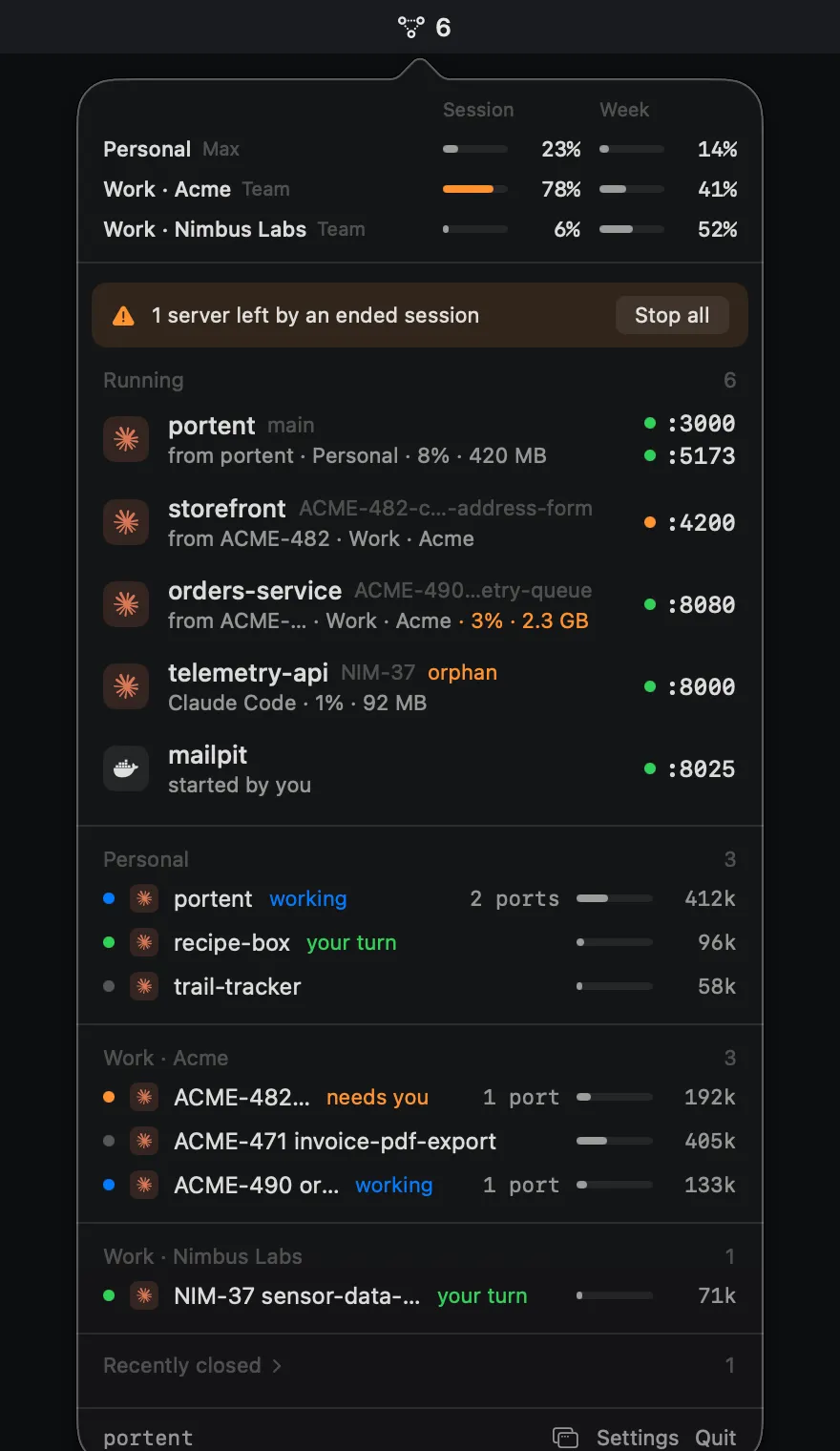
Floating window
Detach the panel into a translucent window on any display, as tall as you like, above other windows. Close it and portent goes back to the menu bar.
 New in 1.0.0
7-day free trial, then €4.99 once
New in 1.0.0
7-day free trial, then €4.99 once
portent lives in the macOS menu bar: Claude plan usage per account, every dev server with who started it, and every live agent session, a click away.
Not notarized yet: the first time, macOS blocks the disk image, then the app. Allow each in Privacy & Security › Open Anyway. The command below skips this.
curl -fsSL https://getportent.pages.dev/install.sh | bash
brew install adrianfernandezalv/tap/portent
No account, no tracking. portent only talks to Claude, Polar for your license, and this site, and update checks are counted without IDs.
Plan usage
Session and weekly limits for each account and organization you use, side by side. portent tells you at 75% and 90%, and again when a heavily used window resets, so you can switch accounts before you hit the wall.
Dev servers
Each port gets a health dot, its branch and its origin: a Claude Code or Claude Desktop session, Docker, or started by you.
Agent sessions
Live Claude Code and Claude Desktop sessions, grouped by account: working, needs you, or your turn. A bar shows how full each context window is, next to the servers that session started.
Notifications
A notification when a session is waiting for a permission or an answer, or finishes a long turn. Click it and that exact session opens in Claude Desktop.
Claude status
When claude.ai, the Claude API or Claude Code has an incident, a banner shows in the panel and a notification tells you, and again when it's resolved. Click either to read the incident.
Command line
The portent command lists your dev servers, stops one by port and shows your plan usage, with or without the app running. Add --json and Claude Code can check what's already on port 3000 before it starts another server.
portent ls
PROJECT PORTS AGENT BRANCH STATE COMMAND
portent :3000 :5173 Claude Desktop main - npm run dev
storefront :4200 Claude Desktop ACME-482 network ng serve --port 4200
orders-service :8080 Claude Code ACME-490 - java -jar app.jar
telemetry-api :8000 Claude Code NIM-37 orphan python3 -m uvicorn app:api
mailpit :8025 - - locked docker compose up mailpit
portent kill 8000 stopped telemetry-api (:8000) portent kill 3000 stopped portent (:3000 :5173) portent kill 8025 mailpit on :8025 is locked in portent, unlock it in the panel first
portent usage
Claude Max
Session 34% resets in 2h 10m
Week 61% resets in 4d 23h
Opus week 18% resets in 4d 23h
> what's running on port 3000? Bash(portent ls --json) ⎿ {"projects": [{"name": "portent", "branch": "main", "agent": "Claude Desktop", … Port 3000 is portent's dev server (npm run dev on main), started by a Claude Desktop session. It also serves :5173. Want me to use 3001 instead, or stop it with portent kill 3000?
Homebrew puts portent on your PATH. With the install script or the disk image, turn it on in Settings › General › Command line tool, which links it into ~/.local/bin.
And more
Detach the panel into a translucent window on any display, as tall as you like, above other windows. Close it and portent goes back to the menu bar.
Ports open to the network get an orange globe. Click it for a QR code, or right-click for the network URL.

Fifteen servers, two dozen sessions: extras and idle sessions fold away when the panel is full.

Follows your system appearance, or pick one in Settings.
A plain connection check every few seconds. HTTP requests only while the panel is open, so your server logs stay clean.
● :3000 connect · no request logged
Open the panel from anywhere with a shortcut you pick in Settings.
For example Option Command P⌥⌘P
Signed in-app updates with Sparkle. Install them automatically or when you choose.
v1.0.0 · release notes
Everything it shows comes from your Mac. No tracking, no portent account.
Pricing
Everything works for 7 days, no key and no card. After that the panel locks until you buy a license: one payment, yours to keep.
€4.99once, not a subscription

One line in the terminal, Homebrew, or a disk image. Every way gets the same signed app, starts the 7-day trial, and updates itself from then on.
curl -fsSL https://getportent.pages.dev/install.sh | bash
Downloads the latest release into Applications, clears the quarantine flag and opens it. Read the script first.
brew install adrianfernandezalv/tap/portent
Installs the cask from the portent tap. Remove it with brew uninstall portent.
Open it and drag portent to Applications. macOS blocks the disk image and then the app the first time: allow each once in System Settings › Privacy & Security with Open Anyway.
portent is signed with its own certificate and isn't notarized by Apple. The install script and the Homebrew cask clear the quarantine flag, so it opens normally. From the disk image, macOS says it can't verify the developer twice: once for the image and once for the app. Each time, open System Settings › Privacy & Security and click Open Anyway. On macOS 15 and later, right-click › Open no longer gets past it.
A Mac on macOS 14 Sonoma or later, Apple silicon or Intel. Plan usage works with the account Claude Code is signed into, and with any claude.ai accounts you sign in to inside portent.
Sessions from Claude Code and Claude Desktop. Dev servers show whether a Claude session, Docker or you started them.
Install portent and everything works for 7 days, no key or card needed. In the last two days a banner in the panel reminds you. After the 7th day the panel locks behind a Buy card, notifications stop and the portent command only answers help and version, until you enter a license key. Updating from a free 0.x build starts the trial then.
€4.99, once. You get every future update, on up to 2 Macs. Buy it here; the key arrives by email, and you paste it in Settings › License or in the card on the locked panel.
A key works on 2 Macs at a time. On the Mac you're leaving, open Settings › License and click Deactivate, then enter the key on the new one. If that Mac is gone, free it from the customer portal.
Sign in to the customer portal with the email you bought it with: your key, your Macs and your receipts are there.
Yes, within 14 days of buying, no questions asked. Write to the contact on your receipt email and the refund goes back to the card you paid with. Polar sells portent as the merchant of record, so your order, invoice and receipts are in the customer portal.
Yes. portent checks the license with Polar when you enter the key and then about once a week. If it can't reach Polar, it keeps working. Only after 30 days without reaching Polar does it ask you to connect once to confirm the license; your key stays, and there's nothing to buy again.
No. portent reads ports, processes and session files on your Mac. It only goes online to read your plan usage and status from Claude, to check your license with Polar, and to fetch updates and a small table of model context sizes from this site. There's no portent account: Polar only knows the email you bought with. Update checks are counted per day and version, with no ID or IP stored, and the site counts visits without cookies.
Yes, through the portent command. Every command takes --json and works without the app running. Add a line like “Run portent ls --json to see which dev servers and ports are in use” to your CLAUDE.md, and Claude Code checks before it starts another server.
No. portent stops a server only when you click Stop, and never stops projects you protect. When ports share a process, it tells you which ones stop together.
portent is self-signed, not notarized. The install script and Homebrew clear the warning for you; from the disk image, use Open Anyway in Privacy & Security once for the image and once for the app.
Quit portent from the panel and move it to the Trash, or run brew uninstall portent if you installed it with Homebrew.
Not notarized yet: the first time, allow the disk image, then the app, in Privacy & Security › Open Anyway.